The roster dashboard
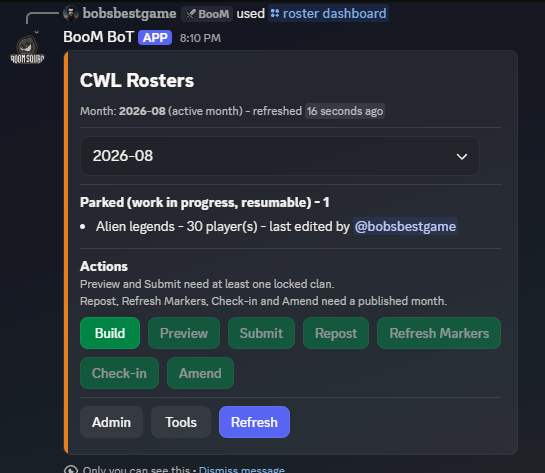
/roster dashboard (leadership) is the single entry point for the entire roster lifecycle. Everything that used to be a dozen separate commands lives on one panel that morphs in place as you work — the only other roster command is /roster import, which exists solely because Discord buttons cannot accept file uploads.
The month selector
Every screen operates on a selected CWL month. The selector offers the months that already have data, the active month, and the next month, plus a free-entry option for anything else (including .5 mid-month CWLs). Pick the month once; every action on the panel applies to it.
The three screens
Roster — the main working screen. A status board shows where the selected month stands (signups, builds in progress, submitted clans, finalized rosters), with the action buttons alongside:
- Build — start or resume the interactive roster builder.
- Preview — post review copies of submitted rosters to your review channel before anything goes public.
- Submit — lock your built rosters in for publishing. See Submitting and publishing.
- Repost / Refresh / Check-in / Amend — the post-publish toolkit. See After publishing.
Buttons enable and disable contextually — you can't publish a month with nothing submitted, and the panel tells you why rather than failing silently.
Admin — the destructive tools, each behind a pick-and-confirm flow: force-close a stuck builder session, wipe a month's finalized rosters, wipe submitted-but-unpublished clans, and purge a clan's data. Admins can force-close anyone's session; leadership can force-close only their own.
Tools — the supporting cast:
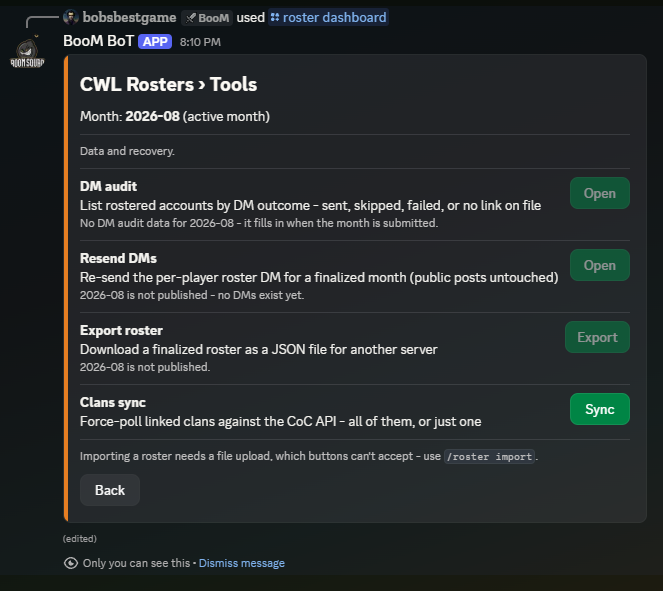
- DM audit — a paginated report of which rostered players actually received their placement DMs, and why any failed.
- Resend DMs — re-deliver placement DMs after fixing whatever blocked them (with a confirm step).
- Export — download a roster as a JSON file, the input to cross-server transfer.
- Clans sync — refresh membership data for all linked clans, or just one, on demand.
Expiry
Dashboards are ephemeral and time out after a period of inactivity — the panel marks itself expired when that happens. Nothing is lost; run /roster dashboard again.